Tuesday, May 31, 2011

How to Set Facebook Security Question ?

How to Set a Facebook's Security Question ?


Follow this link https://www.facebook.com/update_security_info.php

You'll get Option to set a Security Question :)

A Story....


An Indian man walks into the New York City bank and asks for the loan officer.

He tells the Loan Officer that he was going to India for some business for 2 weeks and needs to borrow $5,000.

The Loan Officer tells him that the bank will need
Some form of security for the loan.

So the Indian man hands over the keys and the documents of the new Ferrari car parked on the street in front of the bank.

The loan officer consults the president of the bank,
Produces all the required items and everything check out to be OK.

The loan officer agrees to accept the car as a security for the loan.

The bank president and the Loan Officer had a good laugh at the Indian
For keeping a $750,000 Ferrari as a security and taking only $5,000 has a loan.

An employee of the bank then drives the Ferrari
Into the banks underground garage and parks it there.

Two weeks later the Indian returns and pays $5000 and the interest which comes to it $15.41.

Seeing this, loan officer says,

Sir, we are very happy to have your business
And this transaction has worked out very nicely, but we are a little puzzled.
While you are away, we checked you out and
Found out that you were a multi millionaire.

What puzzled us was why would you bother to borrow $5000?

The Indian replies
"Where else in the New York City can I park my car for 2 weeks and
For only $15.41 and expect it to be there when I return".
This is a true incident and the
Indian is none other than

Sunday, May 22, 2011

Update Status Via "YOUR NAME" | Make Your Own Application in Minutes

Update Your Status Via YOUR NAME 
Or make your Own Facebook Application In minutes :D
STEP 1- Go to this link https://www.facebook.com/developers/createapp.php
Choose the Name of the Application which will be displayed  (Via-"NAME WILL BE SEEN HERE)

STEP 2-
You will then be taken to the Dashboard where you can change the settings of the Application,
We dont have to make much Changes,
On the Same Page you will see 2 Options .
Icon and Logo 
Upload the image that will come On your wall. ( Like the HalfLife icon near my App's name Above )
Use the same Image in Icon and Logo you can change the size for Icon that will be displayed.

Click Save Changes.


On the next page you will see the details of your application
like Api Key App id App Secret etc.
We Need the App ID
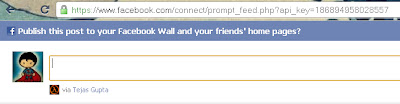
Now just go to this Link and replace the Red test with your App id

http://www.facebook.com/connect/prompt_feed.php?api_key=App ID


Example-


Keep Visiting For More Cool Stuff !

Monday, April 18, 2011

Use Webfonts on your Website

How to use different fonts on your website ?

When ever we use a font on our website a special different font it does not shows up on others PC because they don't have that font...

I've got the solution to this problem !

Web fonts !

yeah the Google Web-fonts allows you to use some special fonts on your website which will be
visible to others too !

Now how to use the webfonts..

Go to http://www.google.com/webfonts/

and select any font you like.

Fie Example we have selected ROCK SALT FONT Now click

Use this Font tab on that page .

You will get a code which you have to paste in the < head > tag of your webpage .

After Pasting the Code you can use the Font in the font face tag .

Thursday, April 14, 2011

The Black Zune theme for XP

Many people are looking for this one.
and many keep asking me
"black windows theme"
"black Zune theme"
"Black theme for SP3"
"Microsoft black theme for XP"

So wanna know what is it...have a look at its screenshot

Its Microsofts offical Theme..available free to download for windows XP

http://go.microsoft.com/fwlink/?LinkID=75078

Enjoy :)
Share this with your friends :D

Saturday, April 9, 2011

Sony Ericsson XPERIA Play | Price In India

Sony's latest Innovation is in the market now !
Yes the New Sony Erisccon Xperia Play is out now,it is powered by Latest Google Android OS.
It has got a large 4-Inch touch screen also it is powered by amasing 1GHz Qual comm CPU with the Adreno 205 GPU and 512 MB of RAM.It has specia lgaming keys like the one in PSP in the slider.
Lets have a Closer look at this cool stuff !

There are two loud speakers on the edges of the phone .The sound quality is excellent for enhanced music listening .


Sony Ericsson Xperia Play mobile key features :
  • 4-inch LCD touch screen , FWVGA (854 x 480 pixels) resolution
  • 1GHz Qualcomm CPU with the Adreno 205 GPU
  • Android 2.3 Gingerbread OS
  • Dedicated Gaming keys
  • Motion gaming : turn, swing, move your phone to control the action.
  • Gesture gaming : Position yourself in front of the phone’s camera and move your body to win the game.
  • 3D games : Enjoy quality games with full color and depth.
  • Wireless LAN WiFi
  • 3G connectivity

Sony Ericsson XPERIA Play Gaming Mobile Phone specifications :
  • Network : Quad band GSM , 3G HSDPA
  • Display Screen : 4-inch capacitive touchscreen , 854 x 480 pixels resolution
  • OS : Android OS, v2.3 (Gingerbread)
  • CPU : 1GHz Scorpion processor, Adreno 205 GPU, Qualcomm MSM8255 Snapdragon
  • Dimensions :119×62×16 mm
  • Available colours : Black , White
  • Weight : 175 g
  • Touch sensitive gaming controls
  • PSP like gaming buttons
  • Accelerometer sensor for UI auto-rotate
  • Proximity sensor for auto turn-off
  • Multi-touch input method
  • Timescape UI
  • 3.5mm jack
  • MEMORY :400 MB, 380 MB RAM user-available
  • Expandable memory : microSD, up to 32GB, 8GB included
    Connectivity
    • GPRS/EDGE
    • 3G HSDPA, HSUPA
    • Wireless LAN Wi-Fi 802.11 b/g/n, DLNA
    • Bluetooth v2.1 with A2DP
  • Camera
    • Front-facing camera – basic VGA
    • Rear (main) – 5.1 megapixel with flash,Image stabiliser ,Auto focus , and Geo-tagging
  • Messaging : SMS (threaded view), MMS, Email, Push Email, IM
  • Synchronisation – Exchange ActiveSync® – Sync Microsoft® Exchange email server.
  • Google Maps – with Street View
  • Micro USB support
  • DLNA Certified : Connect wirelessly to other DLNA certified devices.
  • GPS with aGPS (location-based services)
  • Colors : Black, White
  • Java support
  • SNS integration
  • Active noise cancellation with dedicated mic
  • Digital compass
  • Video Player : MP4/H.263/H.264/WMV player
  • Music Player MP3/eAAC+/WMA/WAV player
  • Google Search, Maps, Gmail,
  • YouTube, Calendar, Google Talk
  • Track ID
  • Flash Lite support
  • Battery : Li-Ion 1500 mAh
  • Talk time : GSM up to 8 hours 25 min , 3G up to 6 hours 25 min
  • Standby time : GSM up to 425 hours , 3G up to 413 hours

Sony Ericsson Xperia Play Price in India

Sony Ericsson Xperia Play Price in India : You can get the new Sony Ericsson Xperia Play Pric in India in Rs.31,000 to Rs.33,000 . It is now available in India.

Drawback

The Only Drawback i see is less number of games,Sony says they will release 50 more games specially developed for this mobile
because you need special games configured for the PSP keys to play..so i think you must wait for a while until all games are launched.

Friday, April 1, 2011

Gmail Motion

Did u check the awsome Gmail Motion ?
No...
The Go ahead nd check this out !

http://mail.google.com/mail/help/motion.html